 ShortDramaKit
Read and share your results
Check a saved list, interpret missing fields and partial coverage, choose CSV or JSON, and share an example without exposing private data.
Check these facts first
A result is useful when you can tell what it describes and how far its evidence goes. Open its original page before relying on a title match. The same name can refer to another production, edition or platform entry.
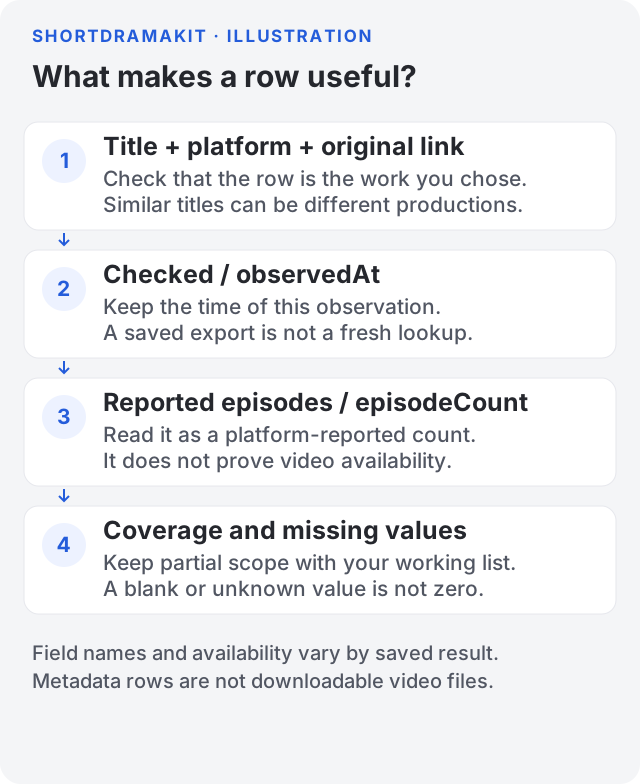
Field illustration, not a live result. No account, task or customer records appear in it.
| In the website | In a collected export | How to use it |
|---|---|---|
| Title and Platform | title, platform | Establish which work and catalog this row describes. |
| Original page / Original link | url | Return to the original platform page; do not substitute a similarly named title. |
| Observed / Checked | observedAt | Record when the information was checked. Re-exporting does not refresh it. |
| Reported episodes | episodeCount, where returned | Preserve the platform's reported count. A directory, trailer, season grouping and accessible videos can have different counts. |
| Partial coverage | Coverage note on the result; nested coverage where retained in JSON | Keep the stated bounds with the list. A flattened column selection may not retain every note. |
Missing fields stay empty, null or shown as a dash according to the output. They do not establish a value of zero or a negative answer. Only include a count or language claim when the saved result actually supplies it. A catalog language label is not proof of an audio track or subtitles.
Choose CSV or JSON
Use CSV spreadsheet for a flat working list. On a saved collected list, open Export settings, choose Fields to include, then select Download CSV. A small first export can keep Title, Platform, Original link, Reported episodes and Checked.
Use JSON when you need nested values or want to inspect the structure preserved by that export. Review the actual file before sharing it: the selected fields and tool determine what it contains. Neither format adds facts that the source did not return.
Import long platform IDs into a spreadsheet as text so it does not round them. Keep unknown values blank rather than replacing them with zero. Preserve the original file if you create a separate cleaned working copy.
Reuse the saved task
Open Activity and select the task you want. Changing the saved collection's fields or CSV/JSON format does not start collection, reserve credits or create a new execution charge. Its observation time stays the same.
A fresh lookup or comparison is different: it needs the currently supported scope and a new accepted estimate. A result limit is not proof of full-catalog coverage. Read Credits and purchases and What short-drama counts can and cannot tell you before comparing outputs.
Share a safe example
Before posting a screenshot or file publicly:
- Make a separate copy and include only the minimum rows and fields needed to explain your question. Confirm you have permission to share the material.
- Remove account names, email addresses, balances, API keys, cookies, authorization headers and payment details. Exclude browser tabs and account sidebars from screenshots.
- Remove private task IDs, task URLs, file URLs and any expiring or signed download links from the public copy. Do not publish internal execution logs or raw service responses.
- Keep a shareable original platform link, relevant field names, observation date and coverage explanation when they are needed for context. Do not turn a redacted unknown value into a fabricated fact.
- Reopen the final image or exported file and inspect it. Check hidden sheets, comments and metadata if your editing tool can retain them.
A public example can use clearly labelled placeholder values. Label an illustration as an illustration; it must not look like evidence of a completed customer task. For private support, include your task ID and the error reference so the team can locate the right attempt, but never send a secret key or card details.
Confirm completion
You are done when the file opens, describes the intended work, retains its source and observation context, and contains only information you intended to share. A completed task status by itself does not confirm that a browser saved a file or that a recipient could use it.
Return to Getting started for the collection steps, or API access to retrieve your own saved results from a server.