 ShortDramaKit
Your first short-drama list, from original link to CSV
Collect one supported title, review the estimate, check the saved result and export a useful spreadsheet without collecting again.
Start with one title you recognize. By the end of this guide, you should have a CSV or JSON file whose title, platform, original link and observation time you can check. You do not need an API key or a video download for this task.
You will need a signed-in ShortDramaKit account, an original title link from a supported platform and enough available credits for the estimate shown in your account. Availability and prices can change: use the selected tool's current coverage and estimate.
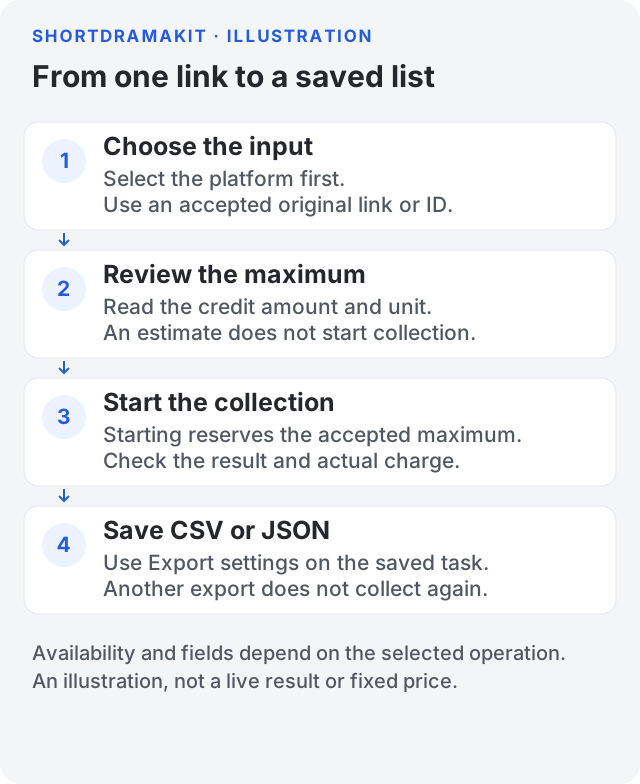
Workflow illustration, not a screenshot of a customer task or a promise of output. Your platform, estimate and returned fields can differ.
1. Choose one supported original link
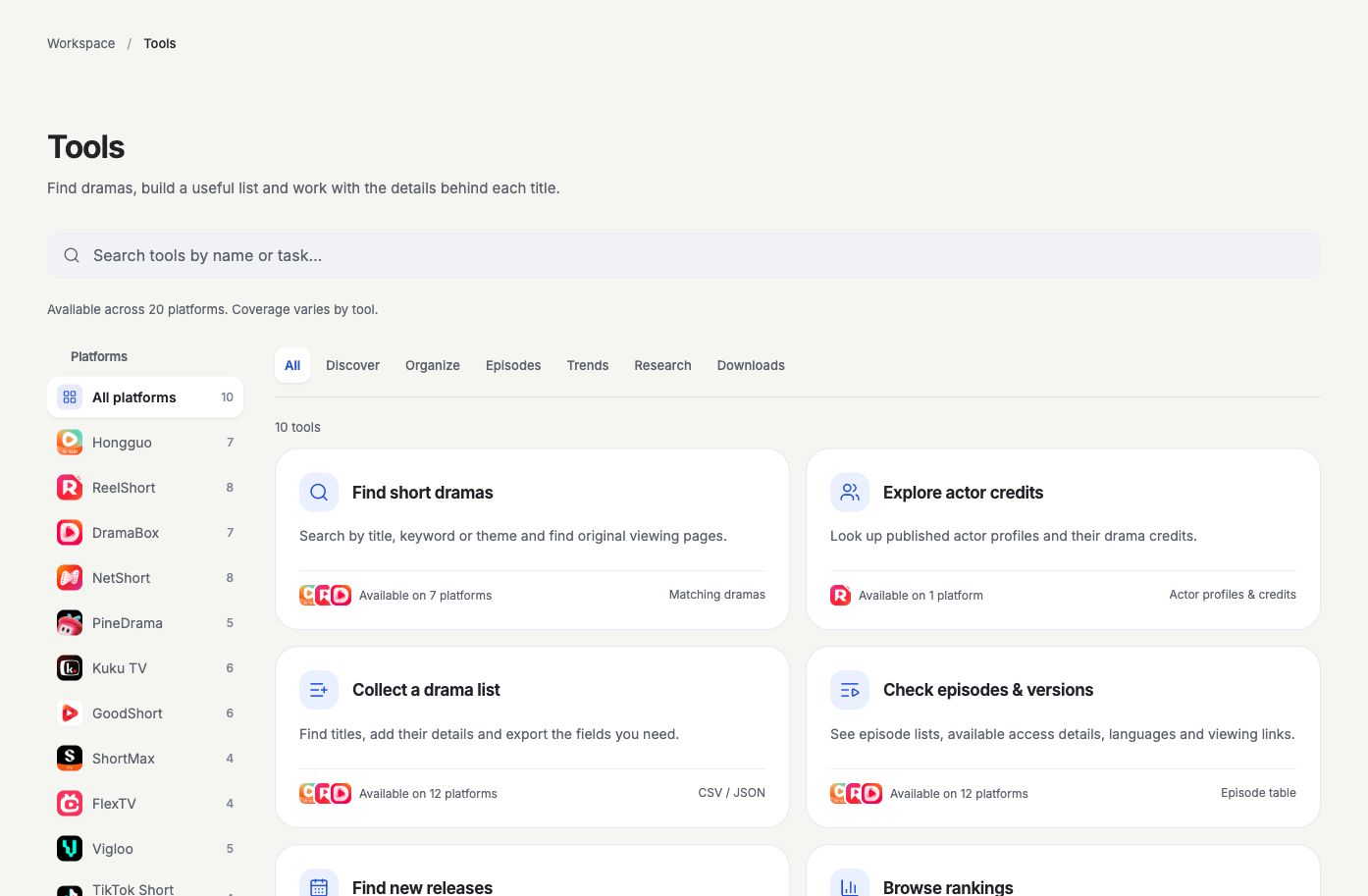
Tools workspace, 1 November 2026. No account identity, balance or task result is shown. Availability can change.
Open Tools and choose Collect a drama list. Select the platform first, then read the coverage note beside it. Only use an input the selected operation accepts.
If the form shows Original title links, copy the title's original viewing-page link from that platform and paste one link per line. Start with one link so you can check its identity before building a larger list. An advertising redirect, screenshot, actor page or ordinary social-video link is not interchangeable with a title link.
Some platforms accept native IDs instead of links. Follow the field label and Platform coverage; do not construct an ID from a translated title. Language and region controls appear only where supported.
Already have a file of original links? Import link file accepts TXT, CSV or JSON up to 1 MiB and reads it on your device. It extracts links; it does not import someone else's saved results. Check the extracted links and selected platform before proceeding.
If you do not have a title yet
Use a supported discovery mode to find candidates. For example, where NetShort category search is available, its published Werewolf category is a bounded English sample, not a search of the full catalog. Other platforms can offer different input modes.
Candidate search can have its own estimate and charge. Select the relevant returned titles and choose Collect selected titles to request their details. Review the collection estimate separately: finding a candidate and collecting its details are distinct actions.
2. Read the estimate before starting
Set Maximum results within the limit shown by the form. The estimate may appear automatically after valid input; otherwise choose Review cost.
Check all three things before selecting Collect a drama list:
- The platform and original reference match the title you intended.
- Up to … credits is an amount you accept.
- The unit and explanation describe the work you want. A result limit does not mean every operation is priced per visible row.
Displaying an estimate does not start acquisition or charge credits. Starting the task reserves up to the accepted maximum; the actual charge appears with its result, and unused reserved credits are released. If you change the input or the estimate expires, review the new estimate before starting.
3. Check the saved result
The progress window opens when execution starts. Hide progress closes that window without cancelling the task. If you leave the page, return through Activity to inspect the saved task rather than starting another collection.
Before exporting, check the result's status, original page, observation time and coverage note. A partial result can still be useful, but it is not a complete catalog. Empty fields mean that information was not returned; they do not mean zero. A reported episode total does not prove that those episodes are available to watch or download.
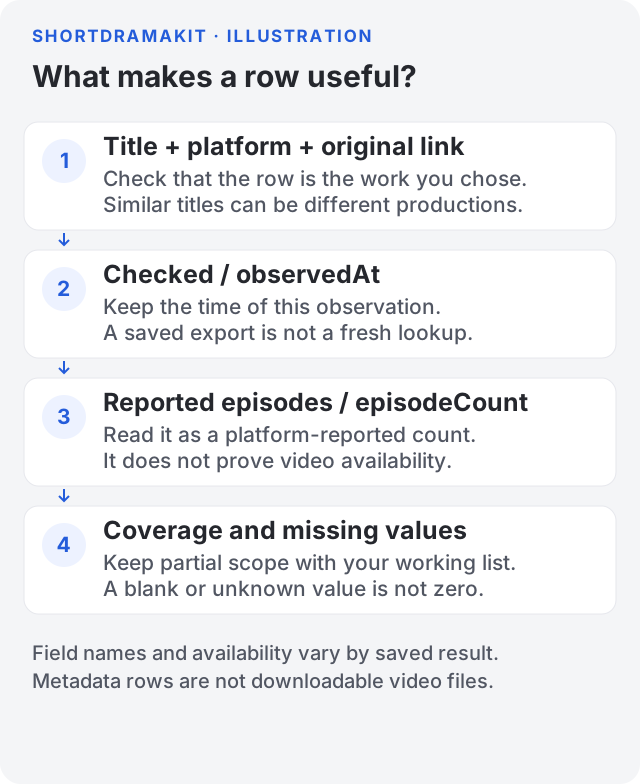
Field illustration only. It contains no customer records, private account data or live collection result. Use your own task's values and coverage notes.
Stop and inspect the original reference if the result describes another title. Do not fill a missing cast, language or count from a guess. If the task fails, read its message and reference in Activity before retrying. For support, share the task ID and error reference privately; leave API keys and payment details out of the message.
4. Choose the columns and download
Open Export settings beneath the saved result. For a first working list, keep Title, Platform, Original link and Checked, then add Reported episodes if that field is useful and returned. Field choices depend on the actual saved result.
Choose CSV spreadsheet for a flat list or JSON to retain structured values, then select Download CSV or Download JSON. The browser must finish saving the file; a completed task alone does not prove that a file reached your device.
Changing these export settings uses the same saved facts. It does not collect again, create another estimate or charge for a new source task. A new collection or refresh is different: review its estimate before execution.
Check that you are done
Open the saved file and confirm the expected rows, the original title link and the observation time. Keep long platform IDs as text in spreadsheet software. Retain any partial-coverage context when you share or compare the list, and do not share account keys or private task/file URLs as public examples.
For a field-by-field checklist and a safe public example, read Read and share your results. You have a checkable working list when those checks pass. Continue with Getting started, Credits and purchases or API access if you want to use the same workflow from your server.